Taking Apart Bun Executables With unbuned
Why I Built This
I like reversing stuff and seeing how apps actually work under the hood. A lot of the tools I use started shipping as compiled Bun apps. Coding agents, CLIs and desktop apps all come as one big exe now and you cannot just open a folder and read the JavaScript like you could with a normal Node app.
So I built unbuned. You give it the exe and it gives you the code back split into the real files with their real names. If the app was built with source maps you even get the original TypeScript back. It is one Python file with no dependencies.
This post walks through what is actually inside a Bun executable and how unbuned takes it apart. Every number in here comes from a real binary and one command so you can check all of it yourself.
What a Bun Executable Is
When you run bun build --compile Bun takes its own runtime and glues your bundled app onto it. The runtime is the same for every app. Your code lives in its own section of the binary:
| Platform | Where the app lives |
|---|---|
| Windows PE | a section named .bun |
| Linux ELF | a section named .bun |
| macOS Mach-O | the __BUN,__bun segment and section, in thin or universal binaries |
That section is the whole target. Everything else in the file is Bun itself and not interesting for this. The first job is finding the section.
Step 1: Finding the Section
On Windows that means walking the PE section table. The table starts right after the optional header and every entry is 40 bytes long with the name in the first 8:
num_sections = struct.unpack('<H', data[pe_offset+6:pe_offset+8])[0]
optional_header_size = struct.unpack('<H', data[pe_offset+20:pe_offset+22])[0]
section_table_offset = pe_offset + 24 + optional_header_size

for i in range(num_sections):
    section_offset = section_table_offset + (i * 40)
    section_name = data[section_offset:section_offset+8].rstrip(b'\x00').decode('ascii', errors='ignore')
    if section_name == '.bun':
        ...
ELF and Mach-O get the same treatment with their own headers. For a universal Mach-O it picks the right architecture slice first. If none of that works it falls back to searching for Bun’s magic bytes so a binary with broken section metadata can still be read.
The file is memory mapped instead of loaded into RAM. Some of these binaries are close to 300 MB and there is no reason to read all of that.
Step 2: Bun Leaves a Map at the End
This is the part that made real file names possible. Bun does not only concatenate your code. Before it writes the section it builds a table of every file it embedded called the StandaloneModuleGraph and it puts that table at the very end.
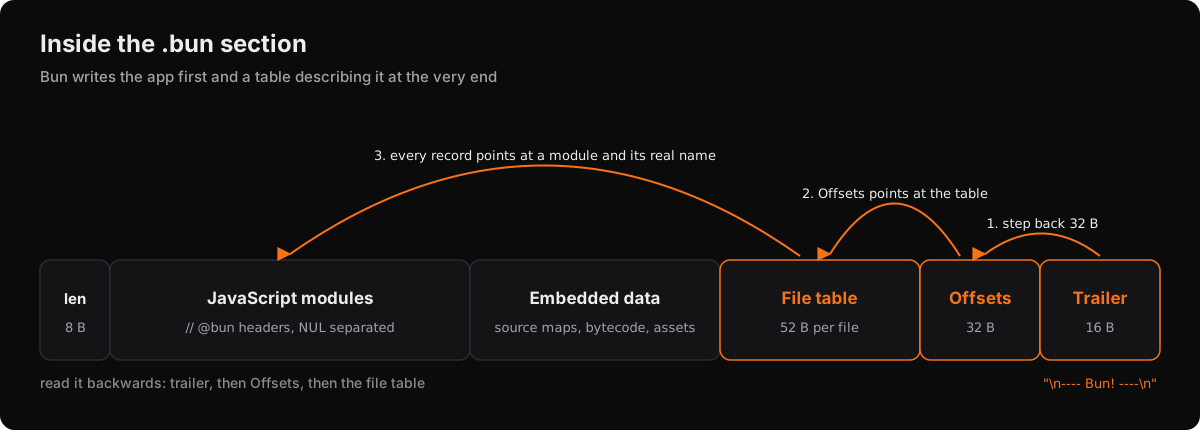
The last 16 bytes of the section are a literal marker:
\n---- Bun! ----\nThe 32 bytes right before that marker are an Offsets struct. It holds the size of the data, a pointer to the file table, the id of the entry point and a set of flags:
...file records...
Offsets   { byte_count, modules_ptr, entry_point_id, compile_exec_argv_ptr, flags }
TRAILER   "\n---- Bun! ----\n"
So you search for the trailer from the end, step back 32 bytes and now you know where the file table is. Every file gets a 52 byte record:
name                  { u32 offset, u32 length }
contents              { u32 offset, u32 length }
sourcemap             { u32 offset, u32 length }
bytecode              { u32 offset, u32 length }
module_info           { u32 offset, u32 length }
bytecode_origin_path  { u32 offset, u32 length }
encoding              u8     0 binary, 1 latin1, 2 utf16
loader                u8     0 js, 1 jsx, 2 ts, 3 tsx, 4 json, 5 file, ...
module_format         u8     0 none, 1 esm, 2 cjs
side                  u8     0 server, 1 client
One detail matters more than it looks. Every one of those offsets is relative to the start of the section plus the section’s own 8 byte length header. If you miss that +8 every pointer lands 8 bytes early and the whole table reads as garbage. The parser checks it too. If byte_count + 8 does not land exactly on the header it refuses the table instead of half reading it.
The records are written in load order with the entry point first. That means a module’s contents offset is exactly where its text starts in the bundle and naming a module becomes a lookup instead of a guess. Factory’s Droid CLI is a 275 MB binary and running unbuned on it gives:
modules named from module graph: 623 of 623
Module graph: 706 embedded files
Entry point: B:/~BUN/root/droid
Graph loaders: 623 jsx, 43 binary, 40 file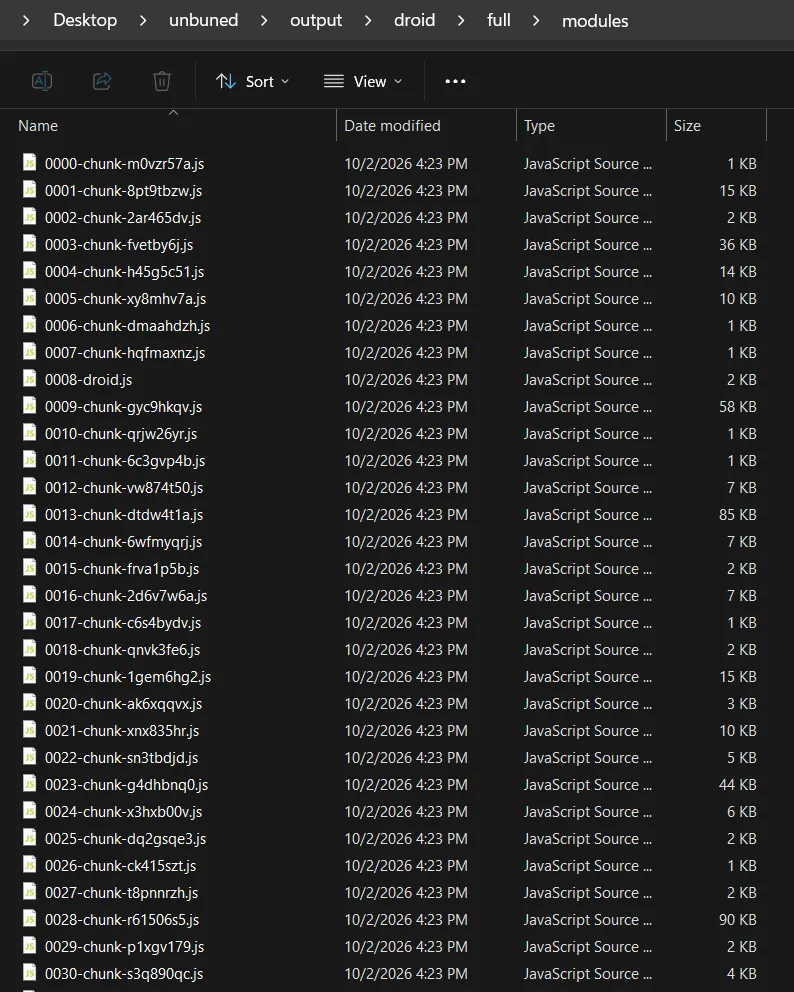
The graph cannot give you names Bun already threw away. By the time it writes the table the chunks are already hashed to things like chunk-9fxe9jf7.js so that is what you get. unbuned reports what the compiler recorded and does not pretend to know more.
Step 3: Where the JavaScript Ends
The bundle itself is a list of compiled modules. Each one starts with a // @bun header line and they are separated by a NUL byte. Finding where it starts is easy. Finding where it ends was the hard part.
Right after the last module comes Bun’s metadata and it is not cleanly binary. Bun mixes printable bytes into it so the region after the code sits around 60% non text while normal source sits under 10%. Some modules also contain real NUL bytes so you cannot just stop at the first one.
What worked was scanning forwards from the last module header that is known to be text and stopping where the density of non text bytes jumps. It does a coarse pass and then a fine pass and then lands on the exact byte instead of the edge of a scan window. It also looks for the markers Bun leaves at the end of code like //# sourceMappingURL= and //# debugId=.
The byte check runs through bytes.translate so a 150 MB section gets scanned inside CPython’s C code instead of a Python loop.
Getting this exact mattered. An earlier version stopped on a window edge and on the Amp CLI it cut the final export default b3n(); in half. Now that bundle ends where the source ends and it parses under node --check.
The UTF-16 Surprise
The Amp CLI also taught me that not every Bun bundle is plain bytes. Its whole JavaScript region is UTF-16 so every ASCII character is followed by a padding NUL. A byte search for // @bun finds nothing and every text ratio reads as half binary.
So unbuned now looks for the marker as plain bytes first and then as UTF-16 in both byte orders and carries the encoding it found through every step after that. Offsets stay in the original byte positions so the manifest still describes the file as it sits on disk. The text only gets converted to UTF-8 when it is written out.
Step 4: Getting the Original TypeScript Back
If the app was built with source maps Bun keeps the original text of every file inside the source map record that each module points to. That is the only place the original TypeScript survives because the bundle itself is already flattened into chunks.
It is not the JSON source map you would expect. Bun reads that JSON once while compiling and writes a compact table instead:
| Offset | Contents |
|---|---|
0 | u32 source count |
4 | u32 length of the raw VLQ mapping |
8 | one {offset, length} pointer per source path |
| then | one {offset, length} pointer per source text |
| then | the VLQ mapping blob |
| then | every path, then every source text compressed with Zstandard |
The paths are relative to whichever file imported them so a shared dependency shows up as ../../node_modules/.... Dropping the leading .. parts puts every file back where it actually was:
src/index.ts
src/exec/acpDaemonRunner.ts
packages/logging/src/tracing/enums.ts
node_modules/@opentelemetry/api/build/src/version.js
On Droid that is 4,914 original files and 42.6 MB of source: 2,487 dependency files, 1,281 files of the app’s own src and 1,146 files from its workspace packages.
Freebuff shows why this matters. It ships one single minified module with 7.4 MB of names like zUA and xH with nothing to split. Its source map still had the real project in it and unbuned pulled out 1,241 original files and 13.5 MB of TypeScript and JavaScript laid out in the real src/, common/, packages/ and sdk/ folders.
The Other Stuff Inside
Bytecode
If an app is built with --bytecode the JavaScript you extract is only the fallback. What actually runs is JavaScriptCore bytecode. unbuned tells you when that is the case and can write one bytecode blob per module using the pointers in the module graph. Every blob starts with the same header. The length in that header matched the graph’s length for every module I tested so it doubles as a check that the extraction is right.
It does not turn bytecode back into JavaScript. JSC bytecode is undocumented and changes between releases so that would be a whole compiler backend and not a weekend feature.
Embedded Files
A Bun app is not only JavaScript. Other files are stored in the same section and many of them are compressed as Zstandard frames. Droid ships 80 of them adding up to about 88 MB including rg.exe, keytar, the rust_pty libraries for four platforms and the SKILL.md files its agent reads. The module graph names all 80 so they come back with their real names. Zstandard is the only optional piece. Without it the files are still pulled out, just left compressed.
Making It Readable
Bun ships minified code and minified code is one giant line per module. Prettier and the other formatters are Node packages that build a full syntax tree and that does not fit a single file Python tool and gets slow on a 40 MB bundle.
So unbuned has its own formatter. It is a single pass lexer that only looks for the things that change layout like strings, template literals, comments, regex literals, operators and brackets and copies everything in between as it is.
It has one hard rule. It only ever adds or removes whitespace. No token is rewritten and nothing is reordered so this always holds:
assert "".join(extracted.split()) == "".join(formatted.split())Testing the formatter turned up a trap in Node too. node --check module.js only really parses a file when it has no import or export in it. A Bun bundle always has them so checking by file path passes without parsing anything. You have to pipe it in:
node --check --input-type=module < module.jsProving It Works
The real test was Cline’s CLI on version 3.0.68. It has 212 separate modules and it broke the extractor more than any other target. One module was hiding behind a shebang that no header pattern could see and the formatter was quietly adding spaces into URLs inside an embedded tree-sitter query file. Both got fixed because of this one binary.
After those fixes the modules put back together match the original bundle byte for byte:
modules: 212
js length: 18386663
rebuilt length: 18386663
identical: True
Then I wrote the module tree back to disk with the 13 assets next to it and ran it. The extracted CLI answers --version with the same 3.0.68 as the real binary. I tried 19 read only commands like --version, --help and --help on every subcommand and every one gave byte identical output and the same exit code as the original. That is a much better check than the output looking like JavaScript.
Try It
git clone https://github.com/vibheksoni/unbuned.git
cd unbuned
python unbuned.py app.exe            # the merged JavaScript
python unbuned.py app.exe --inspect  # what is inside, without writing anything
python unbuned.py app.exe --all      # modules, original sources, assets and bytecode
--all on Droid writes over 6,000 files in about four and a half seconds.
If you want to see it work on something you know just build a small app with bun build --compile --sourcemap and run unbuned on it. You should get your own files back with their real names.
Use it on binaries you are allowed to look at. It is built for reversing, security research, malware analysis and getting your own code back when the project is gone but the exe is still around.
The code is on GitHub. If something breaks on a Bun binary you have open an issue because most of the fixes in this tool came from a real binary breaking it.